FMCG and foods
Your TSOs and distributor salesmen see their incentive before month end.
FMCG companies pay sales officers, distributor salesmen and merchandisers on secondary sales, focus brands and beat coverage across SFA, DMS and HRMS. Kennect is FMCG sales incentive software that joins that data and applies every scheme. Each payee sees the number while the month can still change.
Updated on 14 Oct 2026
Built for scale
85%: Redseer, Why India’s mass grocery still leans on kirana stores, 30 March 2026. 7.8%: NielsenIQ, GST 2.0 transition reshapes India’s FMCG growth landscape, 5 March 2026. 2.5L+ and 90x: Kennect client data, claim register.
The problem
What a monthly scheme cycle costs today.
An FMCG incentive month runs on secondary sales from distributor systems, coverage from the SFA and headcount from HRMS. Distributors bill outside the DMS, reversals arrive days later, and schemes change mid-quarter. All seven FMCG teams in our recent discovery calls lacked a mid-month view of incentive.
Salesmen learn their incentive weeks after the month
No mid-month viewCalculation starts after distributor data is cleaned and reconciled. By then the month is over, so a salesman cannot see how many more outlets billed would have cleared the coverage gate.
Distributor data arrives incomplete and then changes
Disputed payoutsSome distributors bill outside the DMS, and invoices reverse up to 72 hours after billing. Each gap or reversal can move a salesman across a slab, and nobody can show which line did it.
Off-roll salesmen are paid outside the system
Control gapDistributor salesmen and agency merchandisers often sit on distributor or agency payroll. Their incentive is paid through the distributor or a direct transfer, outside the controls that cover employees.
The payee map
Kennect joins SFA, DMS and HRMS data for each month’s hierarchy and pays employees and off-roll salesmen from one plan library.
Plan mechanics
How FMCG sales incentive software pays each scheme.
FMCG schemes stack secondary sales, focus brands, beat coverage and contests in one month. These are the mechanics we see across Indian FMCG plans, and how Kennect runs each one.
Sources: Kennect discovery calls with seven Indian FMCG and foods companies; Kennect product documentation.
Compliance
Distributor scheme payouts now carry a GST question.
Distributor schemes settled by credit note now depend on the recipient. From 1 October 2025, Section 34(2) of the CGST Act ties the supplier’s tax reduction to the distributor reversing input tax credit. Circular 251/08/2025-GST, dated 12 September 2025, treats post-sale discounts to distributors as discounts and not as payment for a separate service. A specific promotional service the distributor performs is taxable on its own. Each scheme payout therefore needs a label: discount, commercial credit note or promotional fee. Kennect keeps the scheme rules, sales data and approver behind every amount it calculates, so finance has the evidence.
Score to payout
From DMS invoice to payout, on one engine.
Every scheme, gate and contest held in dated versions
- Volume slabs, focus brand targets, beat gates and contests sit in one plan library.
- Scheme changes pass maker-checker approval before any payout uses the revised version.
- Off-roll salesmen’s personal data is masked by role, supporting your DPDP Act 2023 obligations.
- Each closed month is locked, and every rerun is logged with reason and approver.
SFA, DMS and HRMS data joined for every month
- Kennect connects to SFA and DMS feeds and snapshots the hierarchy at the start of each month.
- Sales are remapped when a beat, distributor or salesman changes mid-month, using days in role.
- A DMS reversal or late distributor file triggers a rerun, with differences posted to the ledger.
- Calculation runs 90x faster than spreadsheets, so mid-month payout estimates refresh with each data load.
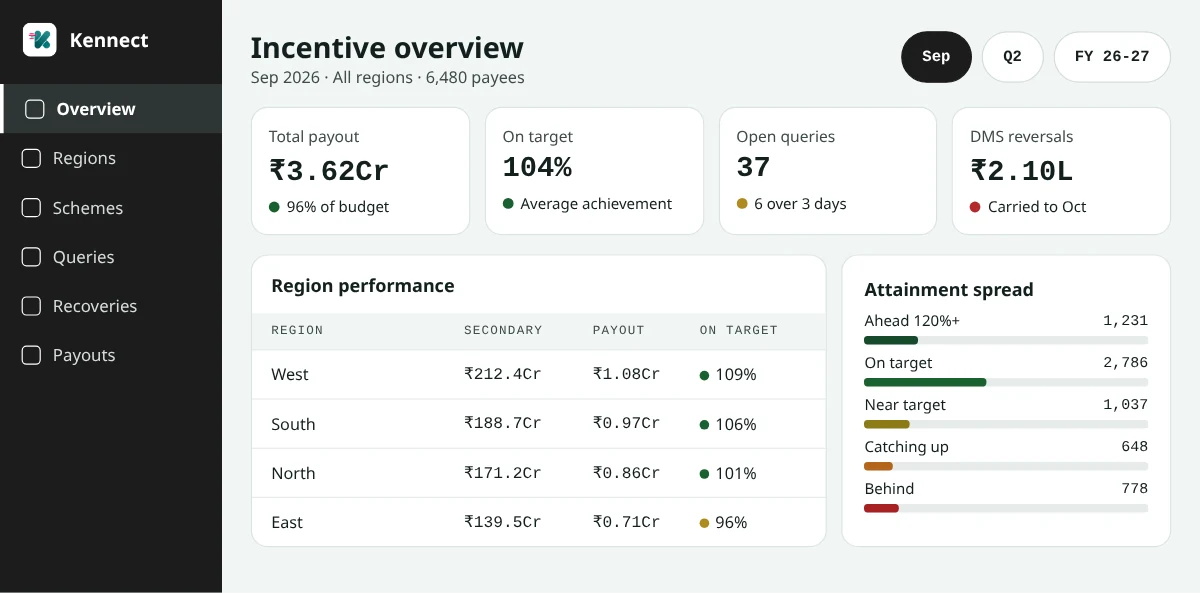
Salesmen see the incentive while the month is open
- Month-to-date incentive, achievement and the sales needed for the next slab appear on the phone.
- Outlet coverage shows against the gate, so the salesman knows how many outlets remain.
- Nudges arrive by WhatsApp and in-app, in about 12 Indian languages, when a slab is within reach.
- The Kennect view can sit inside your SFA app, so salesmen work from one app.
The salesman app
Retail sales incentive software built for the beat.
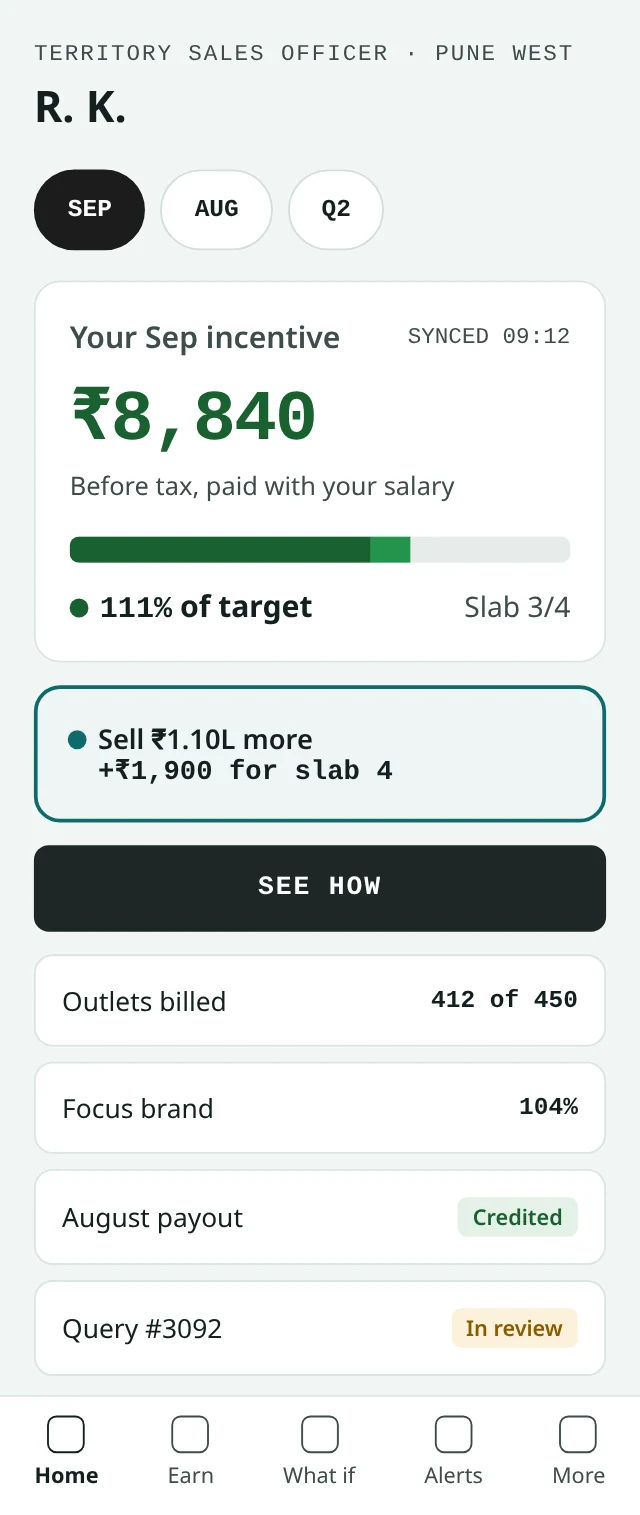
A salesman checks Kennect between outlets. The home screen shows incentive to date, the current slab and the sales or outlets that would move them up. Area managers see the same numbers for the team, ranked by gap to the next slab.
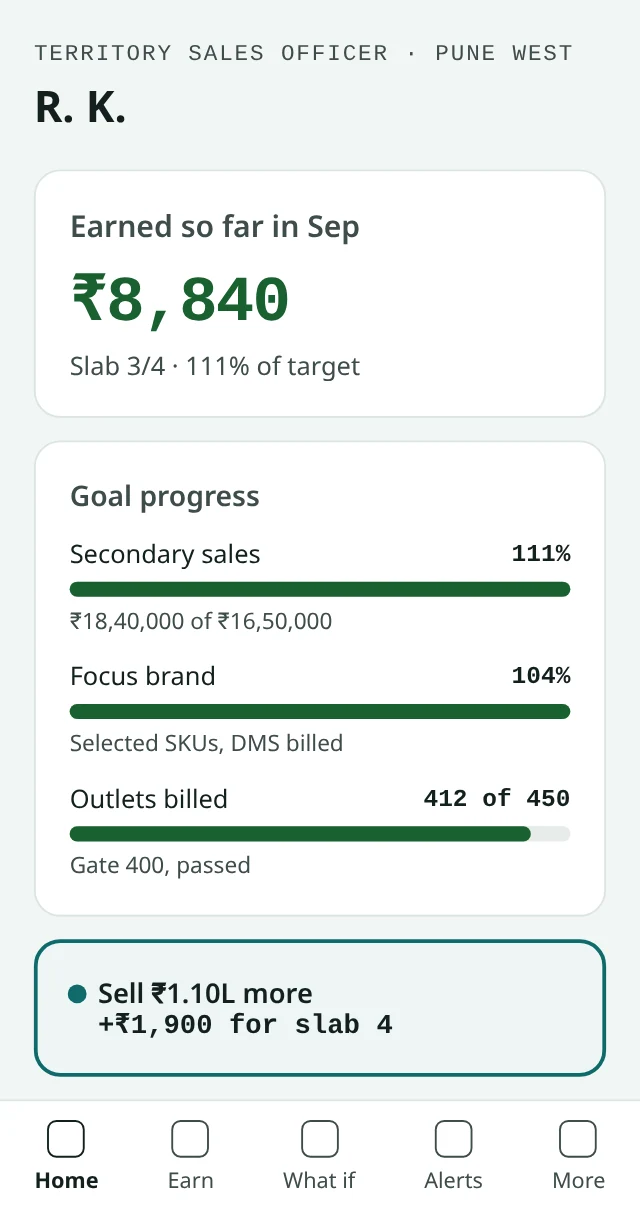
HomeIncentive to date, slab and the sales needed for the next slab.
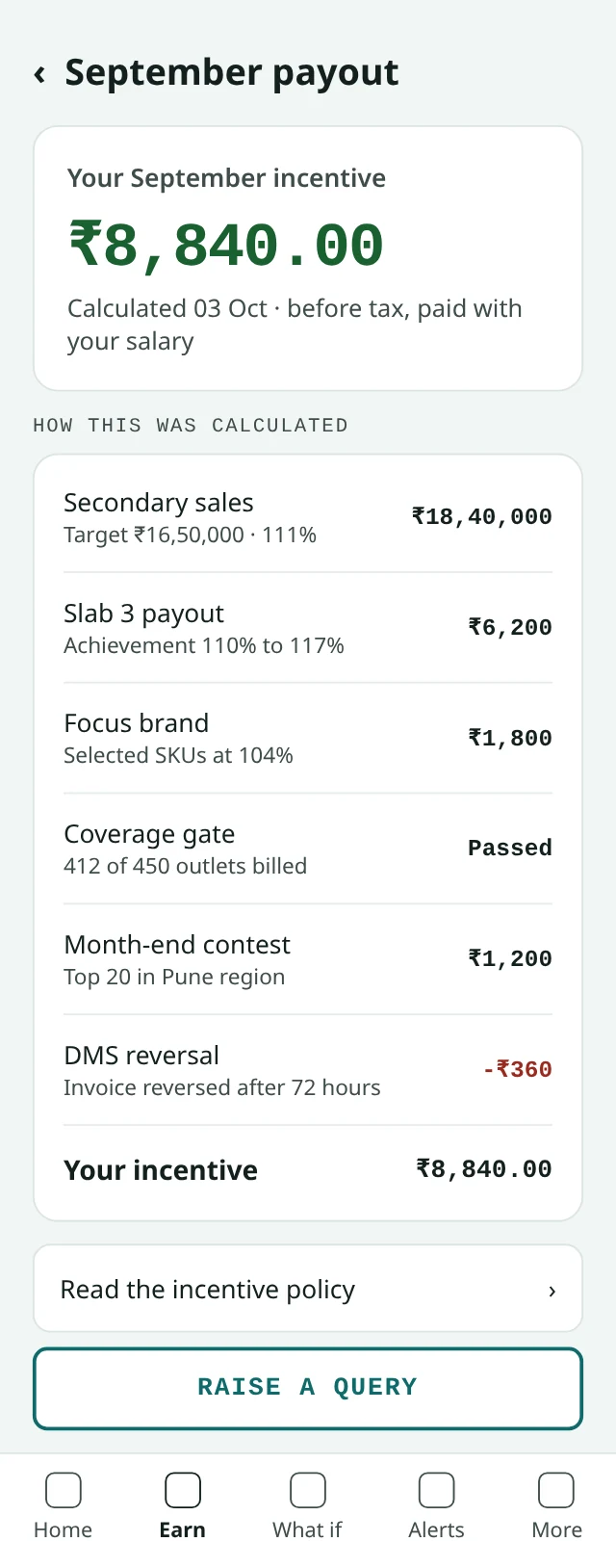
Earnings detailSecondary sales, focus brand, coverage gate and contest lines adding to the total.
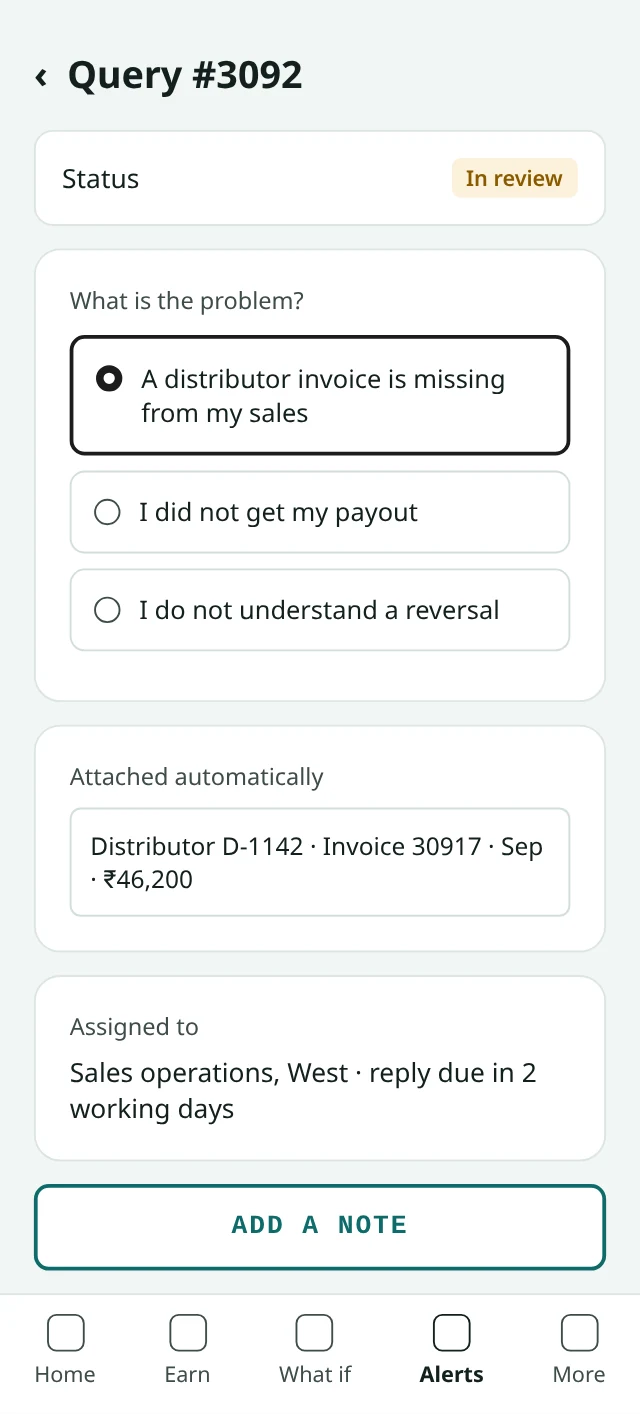
Raise a queryA missing distributor invoice flagged against the exact bill, with status.
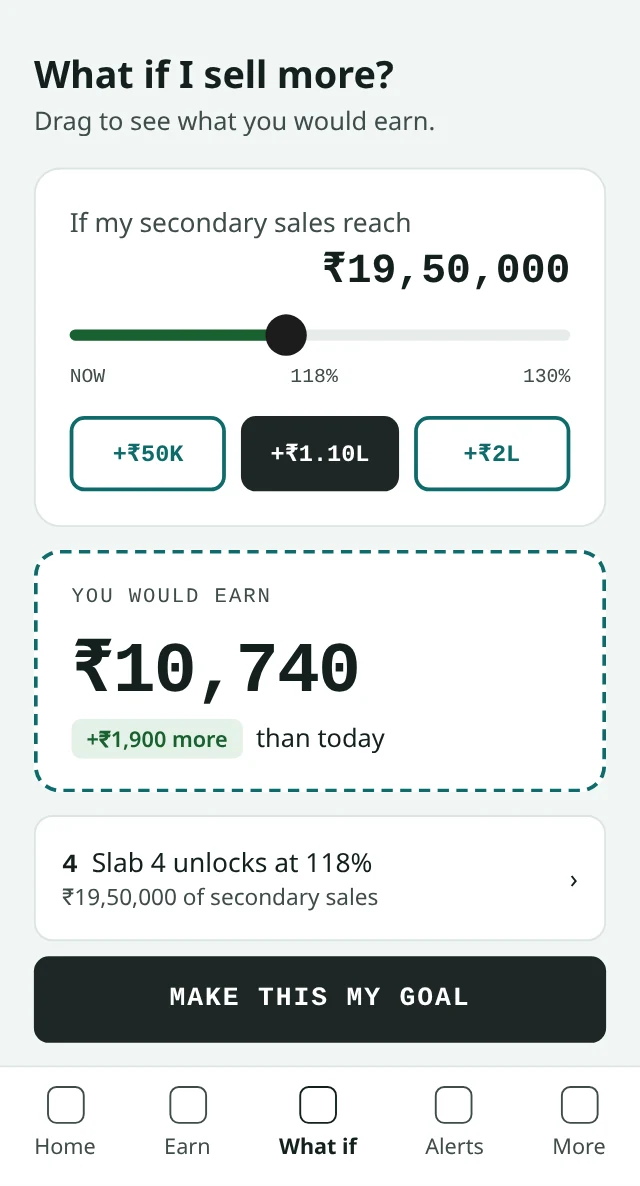
What ifThe payout at ₹19,50,000 of secondary sales, shown before month end.
Going live
Live on a real payout in eight weeks.
We start from the scheme circulars your team already issues and the SFA and DMS data you already hold.
We map your SFA, DMS and HRMS data as it stands.
We configure every scheme from the circulars your team already issues.
We run one month beside your spreadsheet until totals match.
Sales operations keeps the SFA, distribution keeps the DMS, HR keeps the HRMS and finance keeps the ERP. Kennect reads from each and sends approved payouts back for payroll and distributor settlement.
Connect
SFA, DMS and HRMS feeds connected, with the monthly hierarchy snapshot set.
Parallel run
One month calculated in Kennect and matched to your current sheet.
First live payout
Salesmen paid from Kennect, with mid-month views live from day one.
By role
What each leader gets from the same number.
See achievement, coverage and incentive by region and distributor while there is time to redirect effort.
Accrue scheme liabilities from locked versions and give tax teams the record behind every scheme amount.
Replace scheme workbooks with one plan library and rerun a reversed DMS month without rebuilding.
Pay on-roll and off-roll salesmen on one rule set, with personal data masked by role.
See this month’s incentive, the next slab and the outlets left to bill, on your phone.
Questions leaders ask
FMCG incentive questions, answered.
How should an FMCG company calculate distributor salesman incentives on secondary sales?
Calculate on DMS secondary sales net of reversals, mapped to the salesman and beat that owned each outlet that month. The engine applies focus brand targets and coverage gates before the volume slab, then caps. Reversals that land after close are carried as differences to the next payout. Kennect runs this as FMCG sales incentive software, joining DMS, SFA and HRMS data for each month’s hierarchy.
Do distributor scheme credit notes need input tax credit reversal under GST after October 2025?
It depends on the type of credit note. Since 1 October 2025, Section 34(2) lets the supplier reduce output tax once the recipient has reversed the matching input tax credit. Circular 251/08/2025-GST, dated 12 September 2025, says financial or commercial credit notes need no reversal by the recipient. Kennect keeps the scheme rules, data and approval behind every amount it calculates, so finance can classify each credit note with evidence.
Are incentives paid to off-roll distributor salesmen covered by the Code on Wages?
The Code on Wages applies to whoever employs the salesman, which for off-roll staff is usually the distributor or an agency. Since 21 November 2025, commission sits outside wages under Section 2(y), but excluded pay above half of total remuneration is added back. Where incentive is a large share of pay, that changes wage-linked dues. Kennect calculates off-roll incentive on the company’s rules and sends an approved file for the distributor or agency to pay.
How can our TSOs see their incentive in the middle of the month?
Run the calculation on each data load instead of once after close. Mid-month figures apply the final payout rules to the SFA and DMS data received so far. They stay labeled as an estimate until the month locks. Salesmen then know the sales and outlets they need for the next slab. Kennect shows month-to-date incentive on the phone and sends nudges when a slab is within reach.
How do we pay focus brand and selected SKU incentives without a separate spreadsheet?
Set focus brands as their own KPI inside the same plan, with a weight, a cap or a gate on total sales. The KPI reads SKU-level secondary sales from the DMS and pays or gates beside volume, so one payout shows both. A selective product scheme then changes through a new plan version. Kennect’s KPI builder sets focus brand targets, weights and caps by channel and month.
What is beat plan incentive tracking and how does it affect salesman payouts?
Beat plan incentive tracking pays or gates incentive on how much of the planned beat the salesman covers and bills. The SFA records visits and the DMS records bills, so a gate such as 400 of 450 outlets billed is checked from both. Outlets visited without a bill can count differently from productive calls. Kennect reads both feeds, applies the gate before the slab and shows the salesman how many outlets remain.
How do we handle DMS invoice reversals after the incentive month has closed?
Recalculate the closed month on the corrected data and carry the difference to the next payout, leaving the paid amount untouched. Reversals within days of billing are routine, so the plan should state how late a reversal can count. The difference then shows as its own line on the salesman’s earnings detail. Kennect posts every rerun to a recompute ledger with the reason, data file and approver.
Can one incentive platform pay FMCG salesmen in general trade and modern trade?
Yes, when channels run as separate plans that share one payee master and hierarchy. General trade pays on secondary sales, coverage and focus brands, while modern trade key account managers pay on primary sales, listings and account targets. Both need dated versions, approvals and one audit trail. Kennect runs general trade, modern trade and distributor plans on one engine, so a manager’s team rolls up across channels.
Keep reading
More on FMCG and channel incentives.
Next step
Send us one scheme circular.
Share this quarter’s scheme circular and a month of DMS data. In a working session, we configure the scheme in Kennect and show your team each salesman’s payout and gap to the next slab.