Incentive payout errors start with manual handoffs
November 20, 2026
Pralok Chhajed
Pralok Chhajed
Key Insights
Even after careful development, spreadsheets carry errors in 1% or more of formula cells (Panko, University of Hawaii, 2008).
In this blog:
Why incentive payouts pass through so many hands
What each handoff costs in errors and days
How to find the handoffs in your own payout cycle
The guardrails that keep one calculation honest
In the closing weeks I sit in on, the formulas are usually fine. The trouble starts between people. Sales ops exports the data. An analyst fixes mappings in her own copy. Exceptions arrive on email. Audit checks an older version. Everyone is careful, yet the number still changes. So teams add another checker, and the payout slows down. Fewer hands help more than extra eyes. When the number is calculated once, in one place, errors and delays both fall.
Ask your payroll lead this week: how many people touched last month's incentive file?
Even after careful development, spreadsheets carry errors in 1% or more of formula cells (Panko, University of Hawaii, 2008).
In this blog:
Why incentive payouts pass through so many hands
What each handoff costs in errors and days
How to find the handoffs in your own payout cycle
The guardrails that keep one calculation honest
In the closing weeks I sit in on, the formulas are usually fine. The trouble starts between people. Sales ops exports the data. An analyst fixes mappings in her own copy. Exceptions arrive on email. Audit checks an older version. Everyone is careful, yet the number still changes. So teams add another checker, and the payout slows down. Fewer hands help more than extra eyes. When the number is calculated once, in one place, errors and delays both fall.
Ask your payroll lead this week: how many people touched last month's incentive file?
Table Of Content
Why incentive payouts pass through so many hands
No single system holds a whole payout. Sales sits in the ERP or DMS. Activity sits in the SFA or CRM. The hierarchy sits in HRMS. So someone has to export and stitch them together.
Plans change often. Regions add boosters. Leadership launches contests at short notice. Each change means rebuilding the Excel incentive calculation by hand.
Exceptions add more hands. A near-miss arrives on email from the field. A manager asks for a mapping fix. Someone types it into one copy of the file.
Then trust adds the rest. Because the file has gone wrong before, teams add checks. An MIS review, then finance, then audit. Approvals follow on email, one head at a time.
A typical cycle ends up with eight handoffs:
Export sales data.
Fix HQ and customer mappings.
Patch the hierarchy for joiners and transfers.
Run the plan formulas.
Type in emailed exceptions.
Recheck in MIS or finance.
Collect approvals on email.
Send a final sheet to payroll.
Handoffs multiply because no single system holds the whole payout.
What each handoff costs in errors and days
Every handoff creates a new copy of the number. Copies drift. A mapping fixed in one file never reaches the next. An approved exception gets applied twice, or not at all.
Small slips add up fast. Panko reviewed the spreadsheet error studies. Even careful builders left errors in 1% or more of formula cells. At that rate, a file with 5,000 formula cells carries 50 or more errors.
Source: Raymond R. Panko, "What We Know About Spreadsheet Errors," University of Hawaii, revised 2008
Each handoff also adds waiting. The analyst waits for data. Audit waits for the analyst. Approvers wait for audit. Two days at each of eight steps adds over two weeks. The payout slips into the next month.
The field feels both costs. Reps work blind until the payout lands. When it does, it often has no breakdown. Queries pile up on the same busy team. A reward that arrives late no longer feels tied to the work. The company pays in management hours. It also loses steering of the field.
Each extra handoff adds one more chance of error and one more wait.
A worked example: one payout cycle, with and without handoffs
Here is how one month can look. Take a sales team of 500 people on a monthly plan. The table compares today's process with two ways of fixing it.
One monthly payout cycle
Today: Excel and email
Calculation automated only
Calculation, workflow and field view
Handoffs before payroll
8
4
2
People who change the number
6
3
1
Days from month-end to payout
38
18
10
People corrected after payout
21
9
3
Exceptions handled on email
34
34
0
Field queries in the week after payout
140
120
40
Illustrative numbers, not client data.
The example tells three stories. Automating the calculation alone halves the wait. Exceptions still live on email, so corrections continue. Queries barely move, because reps still see one total with no breakdown. Adding an exception workflow and a field view closes both gaps. Finance can then weigh effort saved against setup cost, with numbers on both.
Automating the calculation shortens the wait. Removing the handoffs fixes the payout.
Where each industry's weakest handoff sits
The chain looks similar everywhere. The weak link changes by industry.
Industry
Weakest handoff
What breaks
Fix it first
Pharma
Stockist-to-HQ mapping
Sales credited to the wrong rep; layered rechecks slow payout
Logged mapping overrides and sales transfers
FMCG and consumer goods
Rebuilding the file for new schemes
Regional boosters and contests miss rules or people
Plans built once, reused by region
Banking and lending
Combining product-wise calculations
One person's pay passes through several teams
One engine for every product
Insurance
Recovering pay after cancellations
Clawbacks done by hand, months later
A payout ledger that carries differences
Collections
Agency payouts by account
Rates vary by bucket and settlement, per agency sheet
Account-level rules rolled up to each agency
Pharma teams often respond with layered checking. A system run, an MIS review, then a full audit. Each layer is another handoff. FMCG teams fight constant scheme change instead. Banking and insurance teams fight fragmentation across products and partners.
Insurance recoveries will grow. IRDAI's September 2026 draft proposes commission clawback where mis-selling is established. Recoveries done by hand will not keep up.
Start with your industry's weakest handoff, where errors begin.
How to find the handoffs in your own payout cycle
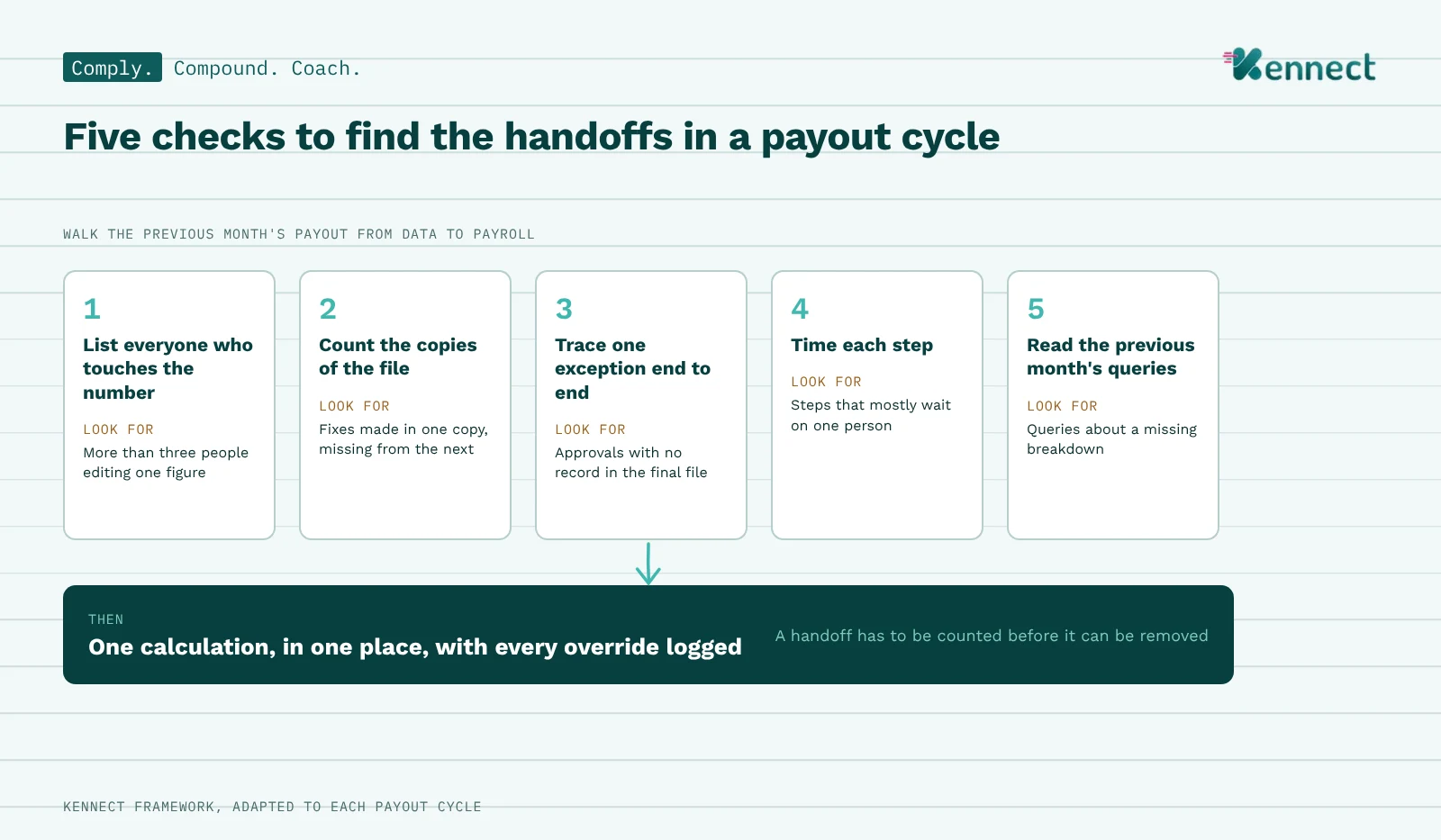
Mapping the cycle replaces guesswork with facts. Five checks cover the ground.
List everyone who touches the number. Walk last month's payout from data to payroll. Write down each person and what they changed. Look for: more than three people editing the same figure.
Count the copies of the file. Ask how many versions existed by the time payroll got it. Look for: fixes made in one copy and missing from the next.
Trace one exception end to end. Pick a near-miss that was approved. Follow it from email to payout. Look for: approvals with no record in the final file.
Time each step. Note when each handoff started and finished. Look for: steps that mostly wait on one person.
Read last month's queries. Group them by cause. Look for: queries about a missing breakdown, where the number itself was right.
A handoff has to be counted before it can be removed.
The guardrails that keep one calculation honest
Removing handoffs does not remove control. Better controls do the checkers' job. They do it without copying the number.
Connect sources on a schedule. Pull ERP, DMS, SFA and HRMS data daily. Nobody exports a file by hand.
Snapshot the hierarchy monthly. Each month uses the structure as it stood then. Transfers and joiners prorate on rules.
Log every override. Mapping fixes and sales transfers need a reason and an approver. Nothing is patched in a copy.
Run data checks before payout. Flag duplicates, overlapping slabs and people with no calculation.
Move exceptions into a workflow. Each request records who asked, why and who approved.
Keep finance in the approval chain. Set approval levels by plan, with a log for each.
Recalculate through a ledger. Late returns or cancellations carry the difference into the next payout. Our guide to commission clawbacks covers the accounting.
The logs serve audit as well. Internal financial controls testing reads the trail. Nobody rebuilds the file to check it.
Guardrails protect the payout without adding a checker.
A 30-day plan to remove the first handoffs
One month is enough to start. A full overhaul can wait.
Week 1: Map the chain. Run the five checks on last month's payout. Pick the two handoffs that cause the heaviest rework.
Week 2: Connect the data. Set up scheduled feeds from the ERP, DMS or CRM, and HRMS. Lock the hierarchy for each month.
Week 3: Move rules and exceptions in. Configure the current plan in one engine. Route exceptions and approvals through a workflow.
Week 4: Run in parallel. Calculate the same month both ways. Fix every difference before the first live payout.
The field view can follow once one cycle runs clean. That is when queries start to fall.
Thirty days of mapping saves a year of rechecking.
How Kennect and KAI remove the handoffs
Kennect is an AI-led sales performance and incentive compensation management platform. One rule engine runs every variable payout. That covers field incentives, distributor claims, dealer schemes and agency payouts.
Comply: one calculation. The calculation engine pulls data from source systems through their APIs. It snapshots the hierarchy each month and runs every plan in one place.
Comply: logged changes. Overrides, exceptions and approvals move through logged workflows. Checks flag duplicates and missing calculations before payout.
Comply: payout ledger. Recalculations carry the difference into the next cycle.
Coach: payout visibility. Each rep sees how the payout was built. That cuts the queries that follow. For operations teams, that means time back every month.
One limit is worth stating. Automation removes handoffs. It cannot fix bad source data. If a sale is recorded wrong in the ERP, it arrives wrong. That is why the checks and logged overrides matter as much as the engine.
KAI in practice. A rep asks why this month's payout dropped. KAI Exceptions points to the gate he missed and the amount at stake. An analyst describes a new KPI in plain words. KAI Simulations drafts it for review, without a formula sheet.
Kennect calculates the number once, so nobody has to copy it.
Still passing the incentive file around every month?
Count the handoffs in your last cycle. Then see how one calculation replaces them.
Manual mapping fixes, late exceptions and outdated file versions cause payout errors. The formulas are usually right. Errors creep in when data is re-exported. A fix lands in one copy only. An emailed approval never reaches the sheet. Returns and cancellations add more after payout. Removing handoffs cuts the chances for each.
Pharma struggles with stockist-to-HQ mapping, FMCG with changing schemes, and banking with combining product calculations. In banks and insurers, each product team calculates its own part. It then recovers money after cancellations. The fix is the same in all three. Use one engine and one record of every change.
Move the calculation into a system that applies every rule the same way each cycle. Spreadsheets break when formulas get copied or cells get edited by hand. Built-in checks flag duplicate records before the file reaches payroll. They also flag people with no calculated incentive.
Delays usually come from manual handoffs between data, calculation, checks and approvals. Each handoff waits on the next person, so payouts drift past period close. With calculation and approvals in one system, payouts run soon after data is final.
One system should calculate it, and two or three people should review and approve it. Nobody should edit the number outside the system. More than three editors today means more copies that can drift.