Excel to incentive software migration can go live in 8 weeks.
October 23, 2026
Puneet Gupta
Puneet Gupta
Key Insights
Raymond Panko's review of spreadsheet audits found errors in at least 86% of the spreadsheets examined. The incentive teams I meet know this already. They keep Excel anyway, because it is flexible, it is theirs, and a wrong first payout on a new system would cost months of trust with the field.
That fear is the right one to plan around. An Excel to incentive software migration succeeds or fails in its parallel runs. A closed period is recalculated, and every payee difference from the spreadsheet is explained before anyone is paid from the new system.
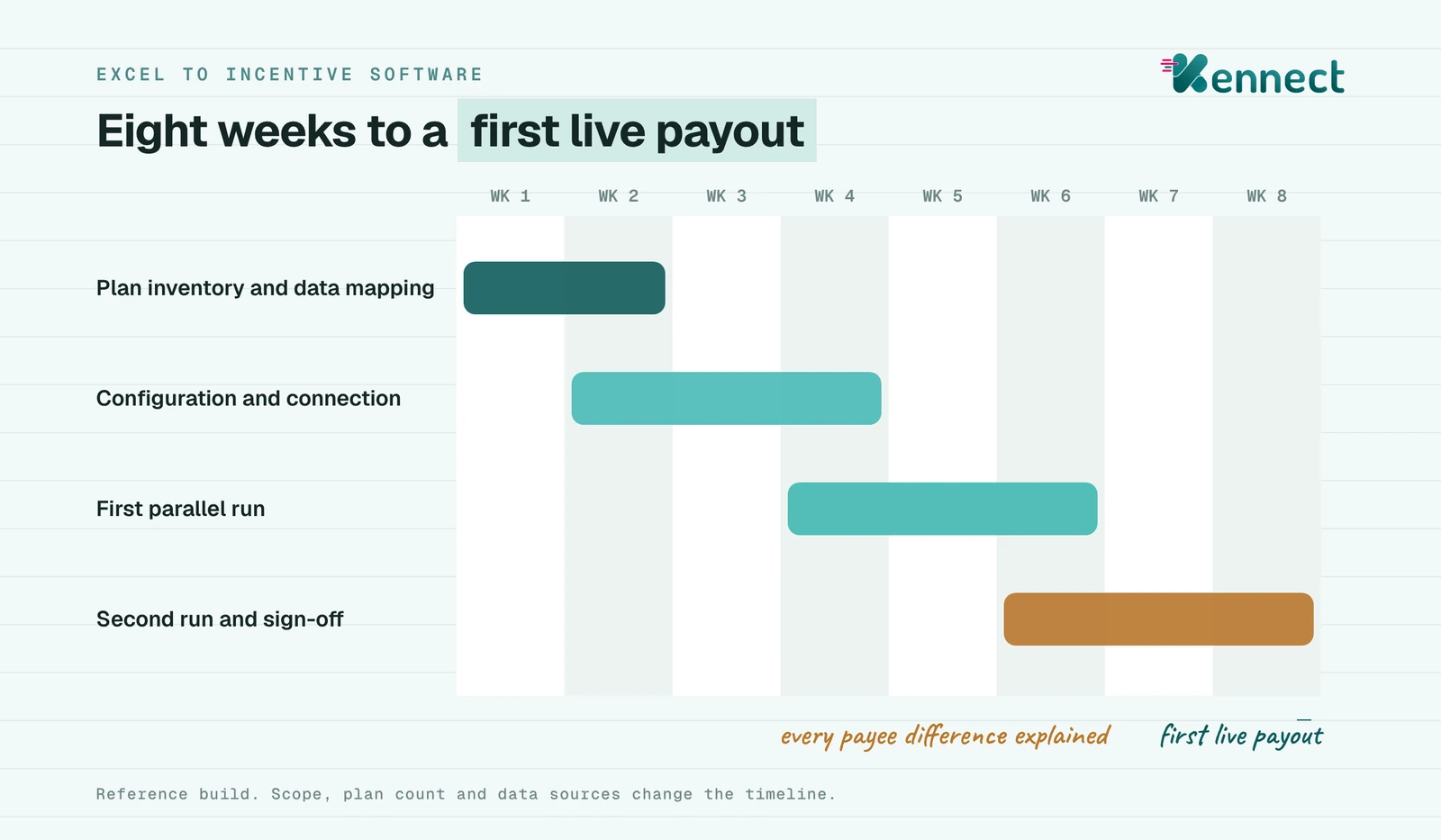
The work divides into four phases: plan inventory and data mapping, configuration, a first parallel run and a second run with sign-off. Five decisions made before kickoff, from frozen plan versions to a written reconciliation rule, decide how long it takes. A reference build reaches a first live payout in 8 weeks.
A question worth asking the head of sales operations this week: how many files fed the previous payout cycle, and who could rebuild them if needed?
Raymond Panko's review of spreadsheet audits found errors in at least 86% of the spreadsheets examined. The incentive teams I meet know this already. They keep Excel anyway, because it is flexible, it is theirs, and a wrong first payout on a new system would cost months of trust with the field.
That fear is the right one to plan around. An Excel to incentive software migration succeeds or fails in its parallel runs. A closed period is recalculated, and every payee difference from the spreadsheet is explained before anyone is paid from the new system.
The work divides into four phases: plan inventory and data mapping, configuration, a first parallel run and a second run with sign-off. Five decisions made before kickoff, from frozen plan versions to a written reconciliation rule, decide how long it takes. A reference build reaches a first live payout in 8 weeks.
A question worth asking the head of sales operations this week: how many files fed the previous payout cycle, and who could rebuild them if needed?
Table Of Content
What the research says about spreadsheets
Raymond Panko's review of spreadsheet audits, presented to the European Spreadsheet Risks Interest Group, found errors in at least 86% of the spreadsheets audited in the more rigorous recent studies. Cell error rates in those audits ran from about 0.4% to 2.5%.
Payroll has its own examples. EuSpRIG records a US county that overpaid $494,157 after salary worksheets lost their formulas through cutting and pasting.
Sources: Panko, Spreadsheet Errors: What We Know. What We Think We Can Do, EuSpRIG Symposium, 2000 · SEC press release 2013-187 and JPMorgan Management Task Force report, January 2013 · EuSpRIG horror stories, Clallam County, 2017
A workbook with thousands of formulas carries errors as a matter of course, and incentive workbooks are no exception.
Why Excel stays in incentive teams
Excel stays because it works for the people who built it. The incentive analyst can change a slab in minutes, test a scheme overnight and answer a sales head the same day. No ticket, no vendor and no release cycle.
The hesitation about moving comes from the field. A payout that changes method in the middle of a year can confuse thousands of reps, and a wrong first payout costs months of trust. That fear is reasonable, and a migration plan should answer it directly.
Whether incentives can be run in Excel at all is covered in the guide to managing sales incentives. This post assumes the decision to move is made and sets out how to do it safely.
Excel stays because it is flexible and familiar, so a migration has to protect the field's first payout above everything else.
The signs that a spreadsheet process has outgrown itself
Four signs show a payout process has grown past what a set of workbooks can carry.
Signs that incentive calculation has outgrown Excel
When the files multiply, the close stretches and one person holds the logic, the workbook has become the risk.
How an Excel to incentive software migration runs
A migration runs in four phases. The timing below follows a reference build, and scope changes it.
An eight-week Excel to incentive software migration, by phase
Weeks
Phase
What is produced
1 to 2
Plan inventory and data mapping
Every plan, KPI, slab and gate listed, and each input mapped to its source system
2 to 4
Configuration and connection
Plans built in the engine, connectors to HRMS, SFA, CRM and ERP, uploads where no system exists
4 to 6
First parallel run
A closed period recalculated and reconciled against the spreadsheet payout, payee by payee
6 to 8
Second parallel run and sign-off
Finance signs off, reps get the app and the first live payout runs
Reference build. The parallel runs in weeks 4 to 8 are where every payee difference is explained.
The parallel run is where trust is built. Every difference between the spreadsheet and the engine is explained, payee by payee. Some will be engine errors to fix. Many will be spreadsheet errors that had gone unnoticed.
A migration earns the field's trust in the parallel run, where every difference from the old payout is explained before go-live.
Five decisions to make before kickoff
Five decisions shorten a migration more than any feature does.
Freeze plan versions. Agree which version of each plan applies to which period, so the parallel run compares like with like.
Name the source of record for every input. Use HRMS for the hierarchy, SFA or CRM for activity and ERP or DMS for sales. The same rule applies to the CRM fields that decide a payout.
Decide how much history to bring. Twelve months is common, so recomputes and recoveries can reach back across the year.
Set the reconciliation rule. Every payee difference in the parallel run is explained in writing, rather than accepted within a tolerance.
Plan the field launch. A statement walkthrough for managers, a short guide for reps and one channel for queries in the first cycle.
Run the first parallel run on a period that had disputes. The engine's answer to a disputed payout is the fastest proof the field will accept.
Frozen plan versions, named data sources, agreed history and a written reconciliation rule decide the length of a migration.
How Kennect runs an Excel to incentive software migration
Our principle is to fill the white spaces and leave the foundation alone. HR keeps working in the HRMS, sales in the CRM and SFA, and finance in the ERP. We connect to each of them and retire the spreadsheets that sit between them.
Configuration with AI. Admins define KPIs by describing them in a prompt, using our AI KPI builder, live today. The same prompt-based approach extends to whole plans shortly, which shortens the configuration phase further.
Parallel runs and audit trail. Every payout drills down to the data behind it, and every change sits in a change log. Plans are held as dated versions, so the parallel run compares the same rules.
Field launch with AI. Reps get a plain-language AI summary of what they have earned, and AI-assisted query resolution handles many first-cycle questions. Every payout traces back to the plan and KPI behind it, and tracing to the underlying data follows by the end of December 2026.
From kickoff to first live payout, our reference build takes 8 weeks. One mid-sized Indian pharma deployment has more than 1,000 medical representatives. There, the seven to ten spreadsheets used each cycle fell to none, and the incentive team saves more than 200 hours a month.
Source: Kennect claim register · time to first live payout, kickoff to first live payout, reference build · spreadsheets per cycle and admin hours, anonymized mid-sized Indian pharma deployment, 1,000+ medical representatives
A migration that connects to existing systems, configures plans with AI and proves itself in parallel runs reaches a live payout in weeks.
What this means for the next plan year
A financial-year plan launches on 1 April. A migration that starts in January can run two parallel cycles on the current plan and go live with the new one. Starting later means another year of the same workbooks.
A migration proved in parallel runs, payee by payee, gives the field a first payout it can trust.
Field audits found errors in 86% of spreadsheets. An eight-week reference build moves incentive calculation off workbooks without changing the systems teams already use.
See how Kennect calculates sales commission and incentive payouts.