CRM to commission automation starts with getting the data right.
October 6, 2026
Puneet Gupta
Puneet Gupta
Key Insights
When a CIO asks me how Kennect connects to their CRM, the question sounds technical. Underneath it is a worry I hear often. Getting reps to use the CRM properly took years, and nobody wants to reopen that fight.
The CRM can stay exactly where it is. What changes is the weight it carries. A close date, an owner, a split, a product line: each was entered to help sell, and each one also decides what somebody is paid. When one of those fields is wrong, the payout is wrong. Fixing the payout in a spreadsheet leaves the field as it was, so the same error comes back next cycle.
The fix sits upstream. Check the fields that drive pay before the calculation runs, freeze them at a cut-off, and keep every payout tied to the record behind it. It is worth the effort: across 75 data quality assessments, 47% of newly created records carried at least one critical error.
A question worth asking the head of sales operations this week: in the previous cycle, how many payout corrections traced back to a CRM field? And how many of those fields were then fixed at the source?
When a CIO asks me how Kennect connects to their CRM, the question sounds technical. Underneath it is a worry I hear often. Getting reps to use the CRM properly took years, and nobody wants to reopen that fight.
The CRM can stay exactly where it is. What changes is the weight it carries. A close date, an owner, a split, a product line: each was entered to help sell, and each one also decides what somebody is paid. When one of those fields is wrong, the payout is wrong. Fixing the payout in a spreadsheet leaves the field as it was, so the same error comes back next cycle.
The fix sits upstream. Check the fields that drive pay before the calculation runs, freeze them at a cut-off, and keep every payout tied to the record behind it. It is worth the effort: across 75 data quality assessments, 47% of newly created records carried at least one critical error.
A question worth asking the head of sales operations this week: in the previous cycle, how many payout corrections traced back to a CRM field? And how many of those fields were then fixed at the source?
Table Of Content
How often the data behind a payout is wrong
Few teams have counted. The research gives a starting point.
Tadhg Nagle, Thomas Redman and David Sammon ran 75 data quality assessments in which managers checked 100 recent records from their own department. 47% of newly created records carried at least one critical error. 3% of the scores met an acceptable bar of 97% correct records.
Source: 47% and 3% · Nagle, Redman and Sammon, "Assessing data quality: A managerial call to action", Business Horizons, vol. 63, no. 3, 2020 · 75 assessments over two years · records drawn from the participants' own departments, not from CRM systems specifically
Every payout rests on fields that were entered for another purpose, and the error rate in new records is high enough to reach a typical cycle.
How the problem shows up before anyone names it
Three symptoms show up before anyone calls this a data problem.
The same correction returns
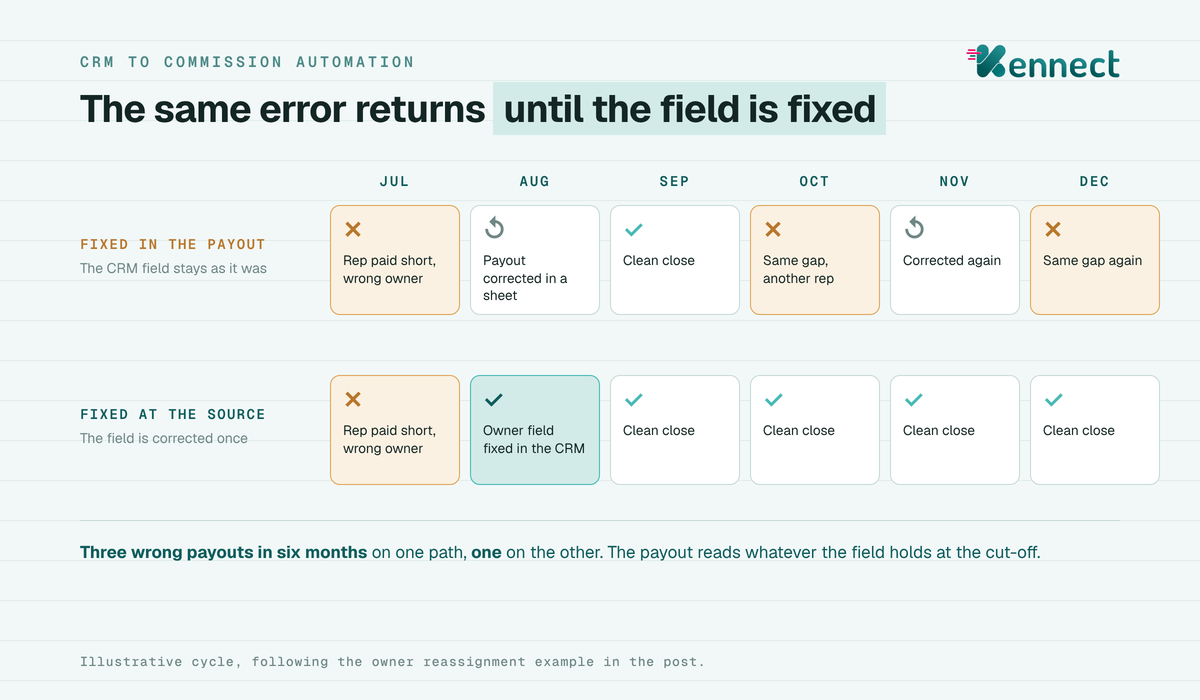
A rep is paid short in July because the deal sat under the previous owner. The correction goes through in August. In October the same reassignment gap underpays a different rep in a different region.
Disputes cluster around month end
Queries rise on deals whose close date moved across the cut-off, and on deals split between two reps. Both are fields that change late in the month.
Two systems disagree on one sale
The SFA shows a sale against one outlet code. The distributor's DMS shows it against another. Achievement looks short for one rep and doubled for another.
When disputes cluster on the same few fields, the cause sits upstream of the calculation.
Why the same error keeps coming back
Three things happen to a CRM field between the sale and the payout. Each one can move money.
The field is wrong when it is entered
A close date typed a week late. A deal value entered with GST in one record and without it in the next. A product line left blank, so the focus-product kicker never triggers. The 47% figure above describes errors at this stage.
The field changes after it is entered
Owners are reassigned when a rep exits or changes territory. Close dates move toward a quarter end. Paul Oyer showed in 1998 that sales bunch at fiscal year ends when pay rises steeply near a target. Ian Larkin later found that deal-timing behavior cost one software vendor 6% to 8% of revenue through discounting.
Each of those moves is a field edit. The payout reads whatever the field holds at the cut-off.
The field disagrees with another system
Indian field plans draw on more than one source. SFA call and order data, DMS secondary sales, a lender's loan system, an OEM's retail data. Each holds its own customer code, its own date and its own definition of a sale.
In lending, a sanction date and a disbursal date can sit a month apart. The RBI's April 2024 fair practices circular found lenders charging interest from the sanction date, which shows how easily the two get swapped.
Then comes the step that makes it repeat. The incentive team fixes the payout in a spreadsheet. The CRM field stays as it was. Thomas Redman calls this kind of unplanned correction work a hidden data factory.
An illustrative cycle: the same error returns until the field is fixed
A correction made downstream fixes one payout and leaves the field that caused it ready to cause the next.
Nine CRM fields that decide a payout
Nine CRM fields and what each one does to a payout
Field
What goes wrong
What it does to the payout
Close date
Moved across a month or quarter end
Credit lands in the wrong period and the wrong slab
Stage
Set to won on order, while the plan pays on invoice or delivery
Payout runs ahead of the event the plan pays on
Amount
Entered with GST in some records and without in others
Achievement shifts by a fixed factor
Owner
Not reassigned after an exit or transfer
Credit goes to the wrong rep, or to nobody
Split
Percentages that do not add to 100
Overpayment, or credit left unallocated
Product line
Missing or filed under the wrong family
Product kicker or launch scheme is not paid
Customer or outlet code
Different in the SFA and the DMS
One rep under-credited, another credited twice
Hierarchy or zone mapping
Not updated after a realignment
Sales roll up to the old manager
Cancellation or disbursal
Reversal never flows back, or sanction date used for disbursal
Clawback missed, or credit paid before the money moved
Commission crediting rules decide how each of these fields is read. Split commission management decides what happens when two reps share one deal. Both sit downstream of the field, so both inherit what the field holds.
Nine fields carry the payout's risk, and each one has an owner who usually sits outside the incentive team.
Three questions to test your next cycle
Three questions, answerable from the previous close.
Can every payout line be traced to the CRM or SFA record that produced it, without rebuilding the join by hand?
Is there a data cut-off, after which field edits move to the next cycle?
When a payout is corrected, does someone reopen the source field and fix it there?
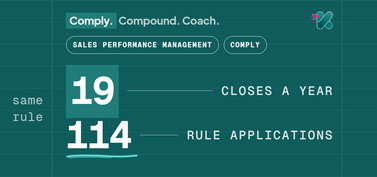
Two answers of no and the errors will repeat at the rate the plan closes. A monthly plan with quarterly and annual elements can run 17 or more closes a year, and each one reads the same fields.
Count a yes to question one as a no if the trace depends on one analyst's workbook, because that lineage leaves when the analyst does.
A payout that cannot be traced back to its source field predicts that the same error will return.
What a wrong field costs
The cost compounds in time spent. Thomas Redman published his rule of ten in Harvard Business Review in 2012. It states that a unit of simple work costs ten times as much to complete when the data behind it is flawed.
Apply that to an incentive close. Each wrong field becomes a reconciliation, a recalculation, a query from a rep and a second approval. Gartner puts the average annual cost of poor data quality at USD 12.9 million per organization, across all uses of data rather than incentives alone.
Source: rule of ten · Thomas C. Redman, "Make the Case for Better Quality Data", Harvard Business Review, 24 August 2012 · USD 12.9 million · Gartner research, 2020, average across organizations surveyed
The limit is plain. Neither figure measures incentive payouts. Redman's rule is a working estimate from his practice, and Gartner's average covers every function. What they show is the direction and the multiplier.
Finance teams have a second reason to care. Under Ind AS 115, a sales commission that is an incremental cost of obtaining a contract is capitalized when the company expects to recover it. Where the amortization period is a year or less, it may be expensed instead. Where it is capitalized, a commission paid on a wrong amount or date also misstates that asset.
The visible cost shows up in the field. A rep who finds a wrong number on a statement starts checking every statement. Queries rise, and trust in the plan falls a little each cycle.
Each wrong field costs a reconciliation in finance and a little trust in the field, and both costs return at every close.
How to fix the field at the source
Three moves change the condition, and each one works with the CRM already in place.
Validate the field before the calculation runs
Check each payout-relevant field against a rule at the point of ingestion. Splits add to 100. Every won deal carries a product line. Every customer code matches across SFA and DMS. Anything that fails goes back to its owner with the reason, before the cycle closes.
Sales data capture automation pays off at this step, because a field checked on arrival never reaches the payout wrong.
Set a data cut-off
Name the date and time after which field edits move to the next cycle. A late edit then becomes a dated adjustment with an approver, recorded in the same place as the payout.
Store the lineage with the payout
Keep each payout line tied to the source record and the field values used. A dispute then becomes a lookup.
Across the deployments we run, the principle we work to is to fill the white spaces and leave the foundation alone.
We leave the CRM, SFA and DMS as the systems of record. We pull the fields the plan needs through the ELT and Calculation Engine, by API, by file transfer or by upload where a system has no API. We flag the fields that fail a rule before the calculation runs. We store every payout against the source row that earned it.
Sales keeps working in the CRM. Field teams stay on the SFA. Distributors keep billing in the DMS. Finance gets an audit trail it can sign. That is what CRM to commission automation should mean: the field reaches the payout faster, and a failed check stops it on the way in.
A field fixed at the source stops the same correction from returning next cycle.
A payout can be no more accurate than the field behind it. Validate the field, freeze it at a cut-off and keep its lineage, and the correction happens once.
See how commission workflow automation pulls CRM and SFA fields, checks them and calculates on one record.


.jpeg)